
From Idea to Shipped Code: The Skills I Run Every Day

Full-Stack Developer
Ask an engineer how they use AI and you will hear a tool name. Ask what happens between an idea and shipped code, and the answer gets vague. These are the steps I follow every day, with the commands I type and what comes back.
The example is one small feature, an export button that lets an admin download the order list as a spreadsheet, followed from idea to shipped code. The feature is made up, but every step is how I run a real one.
What a Skill Is
I used to treat a good prompt as the thing worth keeping. I would explain to the model how to track down a bug, it would work, and a week later I would retype a worse version from memory.
A skill fixes that. It is a short written guide for one kind of task: what to do, in what order, and what finished looks like. Same guide every time, so the work depends less on my mood.
In practice it is a markdown file the model reads before it starts. Here is the top of the one I run at the end of every long session:
---
name: handoff
description: Compact the current conversation into a handoff
  document for another agent to pick up.
---

Write a handoff document summarising the current conversation
so a fresh agent can continue the work.
Most of mine come from Matt Pocock's open skills collection. I start one by typing its name, like /grill-me. We changed some and wrote others ourselves.
Before Any Code
The costly mistakes happen before anyone writes code. A model will build the wrong thing, fast.
So the first thing I type is /grill-with-docs and the idea in one line. The model does not start building. It interviews me in rounds, and every question comes with the answer it would pick:
> /grill-with-docs Add an export button to the orders page

Q1  File format: CSV, Excel, or both?
    Recommended: CSV. Every spreadsheet tool opens it.

Q2  Who can export: everyone, or admins only?
    Recommended: Admins only. Orders hold customer
    addresses.

Q3  A large shop has 80,000 orders. Build the file in
    the browser, or in the background?
    Recommended: In the background, then email a link.
I answer most of them with a single yes. The value is in the question I had not thought of, like Q3. Anything it can find in the code, such as whether an admin role already exists, it looks up instead of asking me.
When the questions run out, it says so and waits. Nothing gets built until I agree we are done.
Most coding tools also have a planning mode. There the model reads the code, guesses what I want, and hands me a finished plan to approve. A confident plan is easy to approve, even when it rests on a wrong guess. With grilling, I answer first, and the plan is written from my answers.
Besides the questions, /grill-with-docs keeps a short word list in a file called CONTEXT.md. If I say customer in one place and account in another, it stops and asks which one I mean. When the model uses the same words we do, a lot of review comments never have to be written. For an idea with no code yet, /grill-me runs the same interview without the notes.
Writing It Down
Next, /to-spec turns the conversation into a spec. It asks nothing new. It writes down the problem, the fix, how we will test it, and a long list of user stories in plain sentences:
1. As an admin, I want to export all orders as CSV,
   so that I can check them in a spreadsheet.
2. As an admin, I want an email with a link when a
   large export is ready, so that I do not wait on
   the page.
3. As a staff member without admin rights, I do not
   see the export button.
I read it and approve it before any building starts.
Then /to-tickets splits the spec into tickets small enough to finish in one sitting. Each ticket is a thin slice through the whole feature, not one layer of it, and says which tickets have to be done before it:
01  Admin downloads a CSV of orders     blocked by: none
02  Large exports run in the background blocked by: 01
03  Email with a download link          blocked by: 02
04  Hide the button from non-admins     blocked by: 01
So the order is on paper, and ticket 04 can run next to 02.
Building
When I am not sure an idea is right, I do not build it properly yet. /prototype makes a throwaway version: for a screen, several different layouts on one page, switched with a link. I click through them, pick one, and the prototype never reaches the real code.
It is the cheapest way to learn an idea is wrong.
Once the direction is clear, /implement takes one ticket at a time and builds it with /tdd, test first. The model writes one test that fails, then just enough code to make it pass, then the next test:
RED    admin downloads orders.csv, one row per order
GREEN  export streams rows from the order list
RED    staff member without admin rights is refused
GREEN  role check added to the export
The tests check what the code does, not how it does it, so they still hold when the code gets cleaned up later. Before the first test, the model asks me where the tests should sit, so the effort lands on the parts that matter.
This is the step I trust the model with most, because the steps before it did the hard thinking. Before anything is committed, /code-review checks the change two ways: does it follow our coding rules, and does it do what the spec asked? I still read it myself.
When Something Breaks
A model left to guess at a bug will read the code, pick a confident theory, and change three files to fix a problem it never saw happen.
So I type /diagnosing-bugs, and the rule is to make the bug happen again first. Say an admin reports that the export email sometimes arrives twice. Before touching any code, the model writes a small script that opens the page, clicks the button twice quickly, and counts the emails:
$ node scripts/repro-double-export.mjs
clicks: 2   export emails: 2   expected: 1
FAIL
Now the bug shows up on demand, every time.
A bug you cannot reproduce is a bug you are guessing about.
From there the fix is usually small. Here a second click started a new export while the first one was still running, so the fix was one check for an export already in progress. The same script then prints PASS, and I check that nothing else changed.
The Right Model for Each Job
Not every step needs the most expensive model, and we only use a model where the client's rules allow it.
- Planning and checking. Claude, which is what we mostly use, holds the plan and reviews the results. A person makes the call on anything that touches money or security.
- Writing the code. A cheaper model turns each ticket into code. That only works because the ticket is written clearly.
- A second opinion.
/codex review, from the gstack collection, sends the change to OpenAI's Codex, which is our second opinion for now. A model from a different company tends to catch different things, and I weigh what it finds against the plan and the tests.
On the export, the second opinion caught something our own review missed. The export ignored the date filter on the page, so an admin looking at last week got every order ever placed. The tests all passed, because none of them had asked about dates.
Handing Over
A session with the model can only hold so much, and long work always hits that limit. Before it does, I type /handoff. The model writes a short note for the next session, and it links to the spec and the tickets instead of copying them:
# Handoff: order export

Decided: CSV only, admins only. Large exports run in the
background and email a link. See the spec and tickets 01 to 04.

Done: 01, 04. In progress: 02, the background job.
Next: finish 02, then 03 (the email).
Watch out: a second click must not start a second export.

Suggested skills: /implement, /tdd
The next session reads that and starts working. It does not need the two hours of conversation behind it.
The note stays short because each decision is written down once, in the spec or a ticket, and everything else links to it.
Between Features
Three more skills are for the time between features:
- Cleaning up.
/improve-codebase-architecturelooks at the parts of the code that change most and finds where they are hard to change. It shows the options as a report, and the one I pick goes back to the start, into a grilling. - Reading up.
/researchsends a background agent to answer a question from the official docs and write the answer down with its sources. I keep working while it reads. - Getting lost.
/wait-whatmakes the model stop and explain its last message again, in plain words. It is one line long, and it saves a lot of rereading.
Here is one card from an architecture report on the export code, cut down:
Candidate: Export logic lives in three places
Files:     the export page, the background job, the email
Problem:   each one builds the order list its own way, so a
           filter fixed in one place is still broken in two
Solution:  one order export module that all three call
Strength:  Strong
It is the same date filter bug the second opinion caught. A filter fixed in one of the three places would still be broken in the other two.
Where a Person Decides
None of this makes the model responsible for the result. Every step still ends with a person deciding. I approve the plan, I agree how it gets tested, and I read every change before it ships.
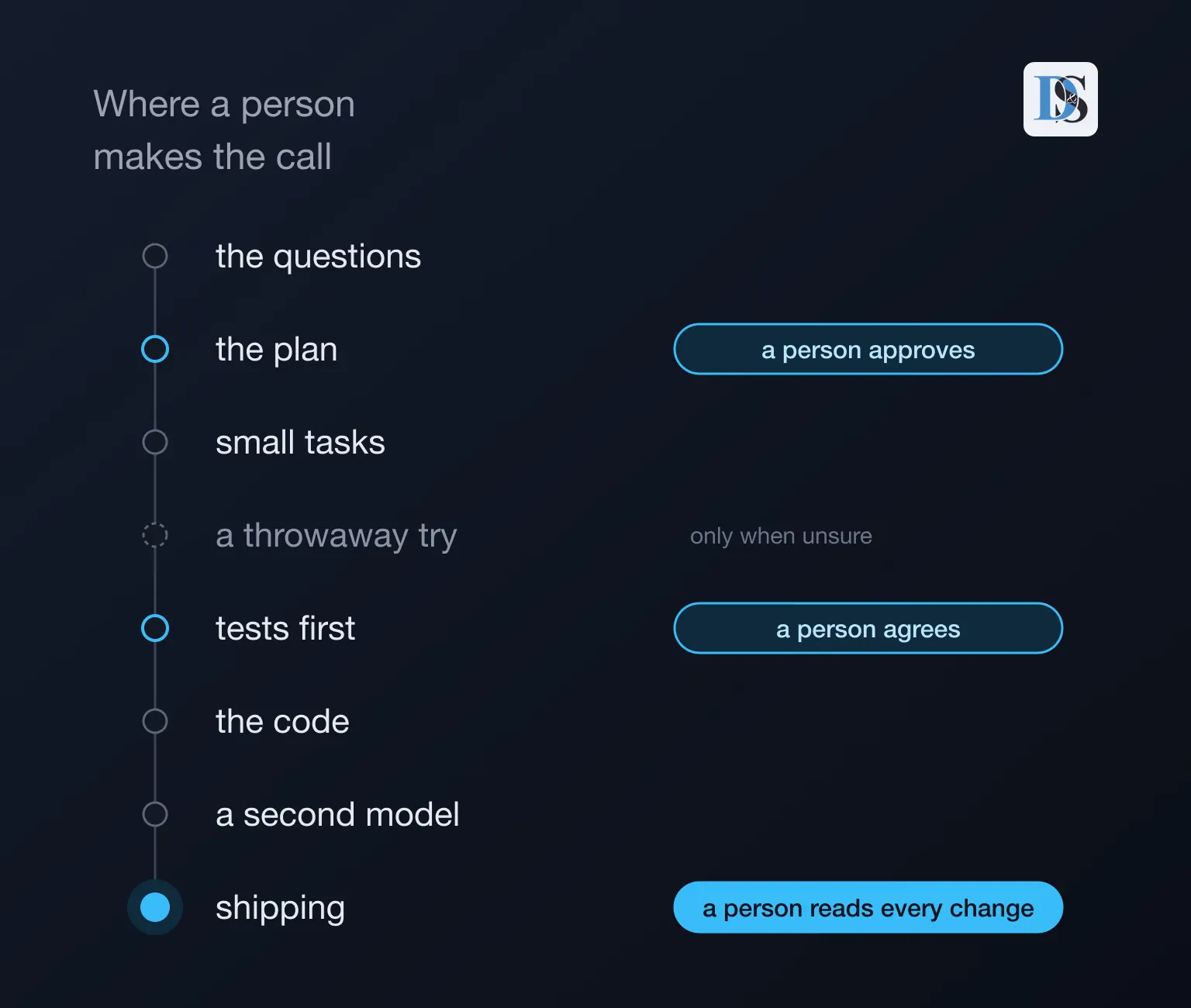
The model does most of the steps. A person decides at the three blue ones.
For a client, that means the plan is settled before the work starts, and every change is checked before it reaches them.
Try It
The skills are free and open source. In Claude Code, one command installs them:
claude plugins install mattpocock-skillsThen, once in each project, /setup-matt-pocock-skills asks where the tickets live (GitHub, Linear, or plain files in the repo) and where the docs go. Other coding agents get the same skills with npx skills@latest add mattpocock/skills.
After that, start with /grill-with-docs on the next small feature you build.
Hero photo by Andrew Neel on Unsplash (https://unsplash.com/photos/cckf4TsHAuw)